기술 블로그 구축 — 배포 중 깃 복구 과정
GitHub Actions가 저장소 파일을 지운 뒤 git pull로 로컬까지 날아간 상황을, 마지막 정상 커밋에서 recovery 브랜치를 따고 develop을 reset --hard로 되돌려 복구한 기록.
기술 블로그 구축 🛠️ 기능 개발 배포 중 깃 복구 과정
작성날짜: 25.04.10
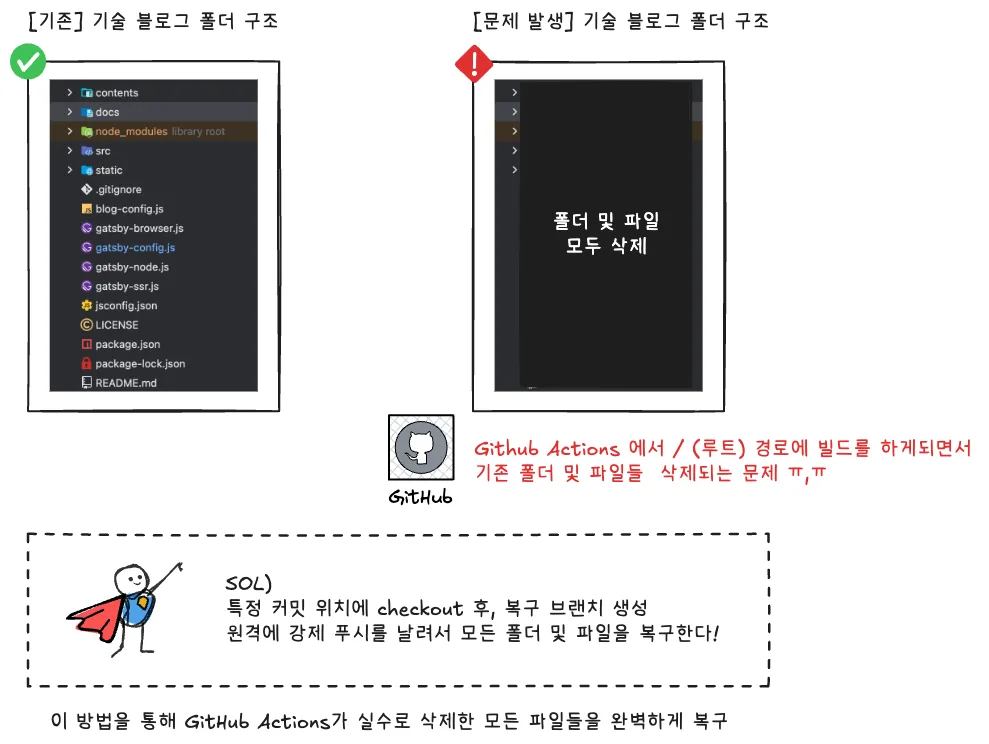
전체 요약
%%{init: {'theme': 'base', 'themeVariables': { 'primaryColor': '#5D8AA8', 'primaryTextColor': '#fff', 'primaryBorderColor': '#1a0dab', 'lineColor': '#F8B229', 'secondaryColor': '#006100', 'tertiaryColor': '#fff'}}}%%

flowchart TB
    subgraph "문제 발생 ⚠️"
        A["GitHub Actions 🤖"] -->|"파일 삭제"|B["GitHub 저장소 🌐"]
        B -->|"git pull 😱"|C["로컬 파일 삭제 💻"]
    end

    subgraph "복구 과정 🚑"
        D["git checkout a4c8d64f 🕰️"] -->|"정상 커밋으로 이동"|E["복구된 파일들 📁"]
        E -->|"git checkout -b recovery 🌱"|F["recovery 브랜치 생성"]
        F -->|"git push -u origin recovery 🚀"|G["GitHub에 복구 브랜치 업로드"]
    end

    subgraph "develop 브랜치 복원 ✨"
        G -->|"git checkout develop 🔄"|H["develop 브랜치로 이동"]
        H -->|"git reset --hard recovery 💪"|I["develop = recovery 상태"]
        I -->|"git push --force origin develop 💥"|J["GitHub develop 브랜치 복원 완료 🎉"]
    end

    C --> D

    style A fill:#FF9AA2,stroke:#333,stroke-width:2px
    style B fill:#FFB7B2,stroke:#333,stroke-width:2px
    style C fill:#FFDAC1,stroke:#333,stroke-width:2px
    style D fill:#E2F0CB,stroke:#333,stroke-width:2px
    style E fill:#B5EAD7,stroke:#333,stroke-width:2px
    style F fill:#C7CEEA,stroke:#333,stroke-width:2px
    style G fill:#9CF6F6,stroke:#333,stroke-width:2px
    style H fill:#A5DEE5,stroke:#333,stroke-width:2px
    style I fill:#A5C8E1,stroke:#333,stroke-width:2px
    style J fill:#CADEFC,stroke:#333,stroke-width:2px,color:#000000
1. 문제 발생 단계 ⚠️
- GitHub Actions가 실수로 파일들을 삭제
- GitHub 저장소에 변경사항이 반영됨
- 로컬에서 git pull을 받아 파일들이 로컬에서도 삭제됨
2. 복구 과정 🚑
git checkout a4c8d64f로 정상 커밋으로 돌아감- 해당 커밋에서 파일들이 복구됨
git checkout -b recovery로 복구 브랜치 생성- 복구 브랜치를 GitHub에 업로드
git push -u origin recovery3. develop 브랜치 복원 ✨
- develop 브랜치로 이동
- recovery 브랜치의 상태로 강제 리셋
- 변경된 develop 브랜치를 GitHub에 강제 푸시
- 최종적으로 develop 브랜치가 복원 완료 🎉
git checkout develop
# 이 명령어는 develop 브랜치로 이동합니다.
# 현재 작업 디렉토리가 develop 브랜치의 상태로 변경됩니다.
# 이 시점에서는 아직 파일들이 삭제된 상태입니다.

git reset --hard recovery
# 이 명령어는 develop 브랜치의 상태를 recovery 브랜치와 동일하게 만듭니다.
# --hard 옵션은 작업 디렉토리의 파일들까지 완전히 변경한다는 의미입니다.
# 결과적으로 develop 브랜치가 recovery 브랜치(복구된 상태)와 완전히 동일해집니다.
# 이 명령 실행 후 작업 디렉토리에는 복구된 모든 파일이 나타납니다.

git push --force origin develop
# 이 명령어는 변경된 develop 브랜치를 원격 저장소(origin)에 강제로 푸시합니다.
# --force 옵션은 원격 저장소의 develop 브랜치를 로컬의 상태로 강제 덮어쓰기 합니다.
# 일반적인 푸시는 원격 브랜치가 로컬 브랜치의 직접적인 조상이 아닐 때 거부되지만, --force 옵션은 이를 무시하고 강제로 푸시합니다.
# 이 명령을 실행하면 GitHub의 develop 브랜치가 복구된 상태로 업데이트됩니다.